|
<< Click to Display Table of Contents >> Source Modelling |
  
|
|
<< Click to Display Table of Contents >> Source Modelling |
|

The Source can have a Positive, Negative and a Zero sequence impedance, OR Three phase and Single phase fault levels defined for Steady State, Transient or Sub-Transient analysis. The Source will assume the Voltage Level of the Bus it is connected to.
1.Name, Number and Description,
2.Per Unit Input Voltage, Angle, Rating (9999 for infinite source)
3.Steady State Three Phase and Single phase fault levels OR Positive, Negative and Zero Sequence Impedances.
4.Transient Three Phase and Single phase fault levels OR Positive, Negative and Zero Sequence Impedances.
5.Sub-Transient Three Phase and Single phase fault levels OR Positive, Negative and Zero Sequence Impedances.
Note: The source fault level is specified in either fault current or source impedance. The user can specify the source using either option by clicking the User Fault Current checkbox. The default for the method of specifying the fault level (i.e. current or impedance) is specified in the Options\Calculations Tabsheet.
There has to be a Bus Bar in the project before a Source can be placed, since a Source is placed or Connected to a Bus Bar.
With the mouse, click on in the Source Button on the Toolbar or use the Source command from the Network main menu. A Source data dialog box will appear. Enter all the relevant information and Click on the Bus Bar to place the Source.
Once complete, Right Click on "whitespace" in the Working Area to Reset the Command.
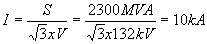
Model a 132kV source with a 2300MVA fault level with X/R ratio = 4. Model the source in impedance.
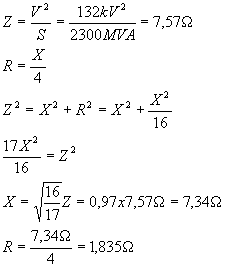
Modelling this in PowaMaster gives a fault current of 10kAÐ-76°
As a quick check:
If the fault current is specified in PowaMaster and the p.u. voltage is changed by the User, the calculated source impedance changes.