|
<< Click to Display Table of Contents >> Transformer Modelling |
  
|
|
<< Click to Display Table of Contents >> Transformer Modelling |
|

Transformer Tap Changer Modelling
Transformer Impedance Modelling - Star, Grounded Star, Delta, Grounded Delta, ZigZag, Grounded ZigZag, Autotransformer
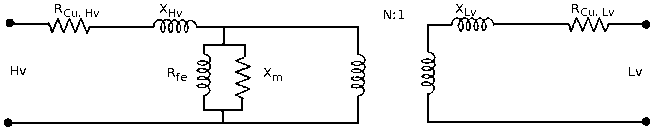
The Transformer is used for transformation of power between different voltage levels in a transmission system.
PowaMaster also allows parallel transformers between Bus Bars.
1.Name, Number and Description,
2.Transformer Type,
3.Derating Factor,
4.Specifications (See Transformer Details),
5.Tap Settings (See Transformer Details),
6.Locked Tap,
7.Tap Changer on the Primary or Secondary Side,
With the mouse click on the Transformer Button on the Toolbar or use the Transformer command from the Network main menu. A Transformer data dialog box will appear. Enter all the relevant information and Click on a Bus Bar in the project from where the Transformer is to be Connected. Click on a second Bus Bar in the project to where the Transformer will connect to.
1.Voltage Validation is done, ensuring that Illegal Voltage Connections will not be successful.
2.The Derating Factor allows the user to specify a maximum capacity for the Tranformer which is below the normal capacity allowed for that Transformer, e.g. If a derating factor of 0.9 is applied to a Transformer of nominal capacity 10MVA, then PowaMaster will indicate that the Tranformer to be overloaded at 9MVA and above. This factor allows the user to cater for Tranformers installed in unusual conditions.
3.If 'Lock Taps' is not checked, the calculation will be started using the selection made from Calculate on the main menu.
Depending on the loading of the network, the user can elect to start calculating with all unlocked transfromer taps set to Nominal, Intermediate or Maximum.
Transformers that have 'Lock Taps' checked, will have the relevant tap settings used for the calculations.